
By default each question gets its own step, which is what makes ROASForm forms convert — but contact details are the one place where asking separately feels like a chore. The Contact Card puts name, email, and phone on a single step, as one item in your question list.
It takes a few seconds to add and you'll usually put it right before your ending.
Add the Contact Card
In the builder, click + Add content.
Under Contact info, choose Contact Card.
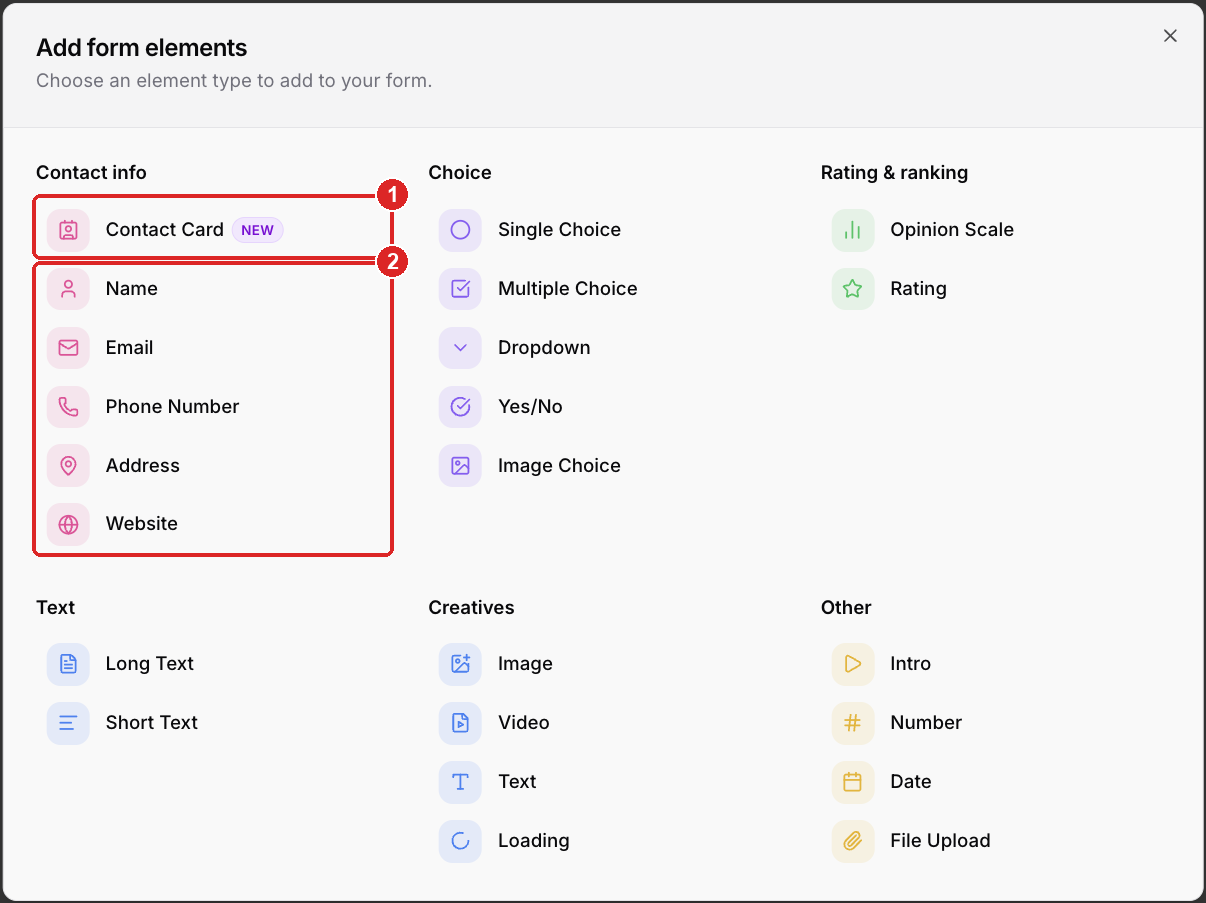
Contact Card — name, email, and phone together on one step
Name, Email, Phone Number, Address, Website — the same details as individual questions, one per step
ROASForm creates the card with three fields:
Field | Required |
Name | Optional |
Required | |
Phone Number | Optional |
If GoHighLevel is connected on this subaccount, these three map to the contact's standard fields on their own. You don't need to set up field mapping for them.
Good to know
The card holds exactly those three fields. You can't add a "business name" or "website" field inside the card. Add those as their own questions on the following step — Website is available in the same Contact info group, and Short Text covers the rest.
It works on Calendar Skin, Chat Bot Skin, and SmartSkin. The labels in the builder are Name, Email, and Phone Number on all of them.
One card per form is the normal setup. Two Contact Cards means asking for an email twice, and the second answer is what syncs.
Troubleshooting
The browser offers to autofill a credit card on this step. That's the browser, not the form. Browsers see a grouped name-and-phone block and sometimes guess it's a checkout. ROASForm never asks for payment details on a form and there's no card field to fill.
You'd rather ask one at a time. Use the individual Name, Email, and Phone Number elements instead. Each one becomes its own step, which usually means a higher completion rate on cold traffic and a slower form for people who are already sold.
Email is rejected as invalid. The Email field validates the format. If a real address is being refused, send us the exact address you typed.