Every edit to a live form changes what later visitors see. Add a question and the old funnel looks like nobody ever reached it; remove one and the people who left on it disappear. The Drop-off tab keeps those apart: one funnel per layout of your form, built only from the visitors who saw that layout.
Open a form, click Analytics in the top bar, then Advanced. Under the Trend Explorer, one card holds two tabs: Question Breakdown (every answer, all time) and Drop-off (where visitors leave, per layout). For the breakdown, see Understanding Your Form Analytics.
A layout is the list of questions your form asks, in order, and the way it shows them. ROASForm starts a new layout when you:
add, remove or reorder a question or screen
change a question's type
switch between one question at a time, Calendar Skin batch mode, and Show All Fields
Rewording a question, changing colours, the skin, or logic rules does not start a layout: the questions are the same, so the funnel still compares like with like.
While nobody has started the newest layout yet, further edits update it in place, so a few rounds of changes before launch do not pile up entries. Deleting a question keeps its data: it stays in the layouts it belonged to, marked Removed later.
The left side lists your layouts, newest first. Each entry shows:
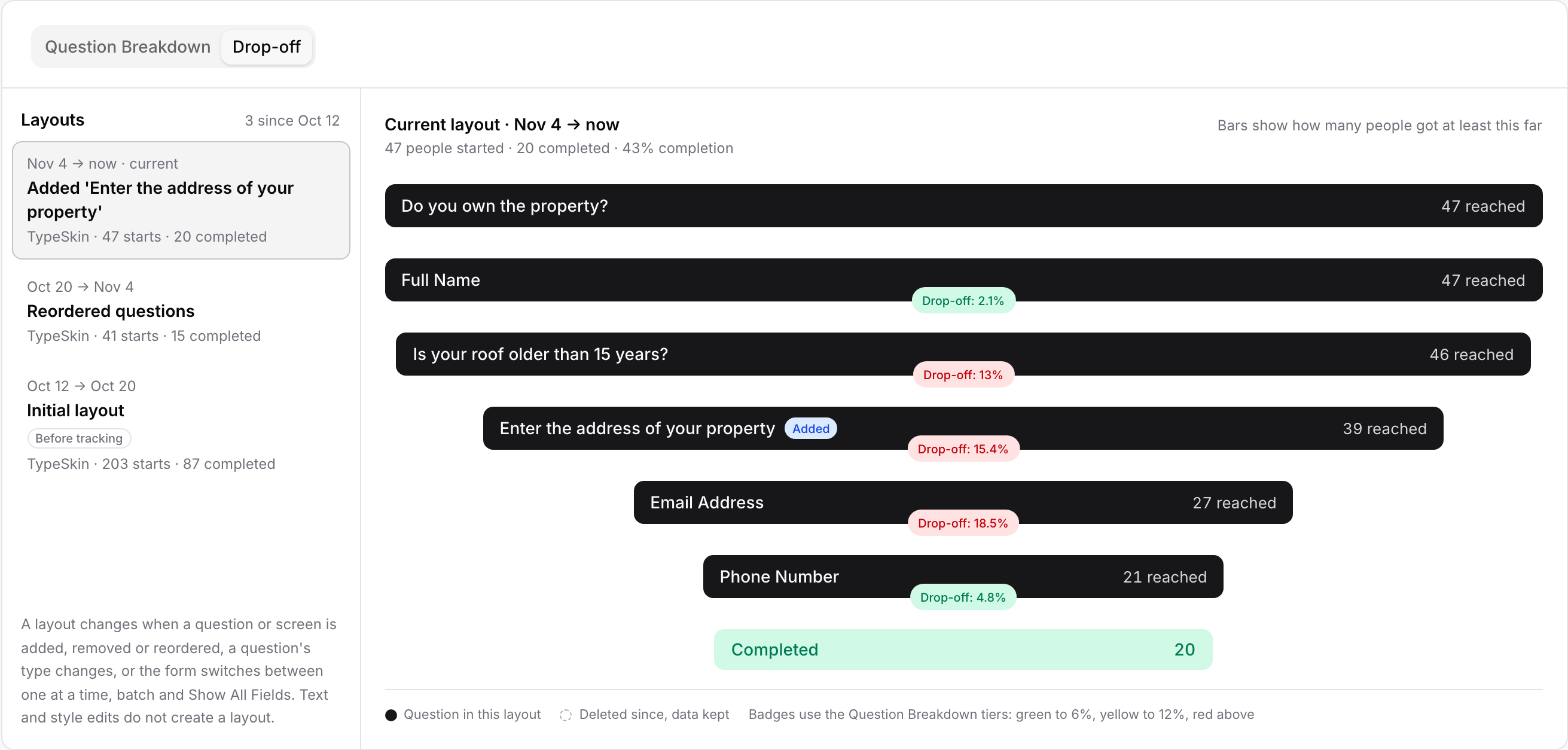
the dates it ran (Nov 4 → now · current for the one visitors get today)
what changed from the layout before it, such as Added 'Enter the address', Removed 2 questions, Reordered questions or Switched to batch layout
the skin, and how many people started and completed the form on that layout in the selected date range
The first entry of a form that collected visitors before layout tracking began carries a Before tracking chip. It merges everything from before that point into one funnel, even if you edited the form during that time; those older versions cannot be separated.
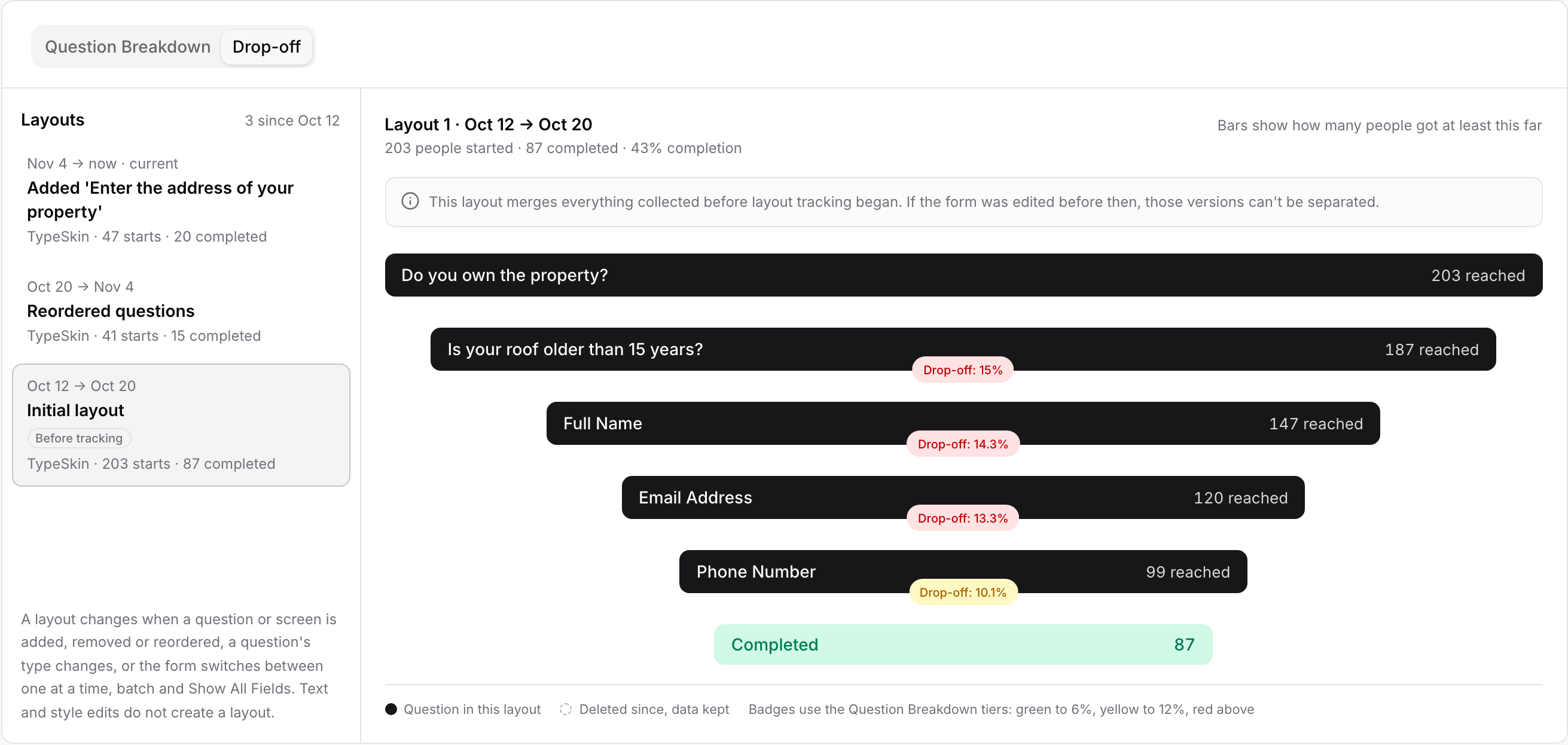
The counts follow the date range picker at the top of the Analytics page. A layout with no starts in the selected range is dimmed. Clear the picker to All Time to see every visitor a layout ever had.
Pick a layout and its funnel shows on the right. Each bar is a question, in that layout's order, and its width is how many people got at least that far, next to N reached. The Completed bar at the bottom is how many finished the form on that layout.
The Drop-off badge on a question is the share of the people who reached it that left the form on it without answering. Green up to 6%, yellow up to 12%, red above, the same tiers as the Question Breakdown. A visitor who opens the form and leaves without answering anything is not counted as a start, so the first question only carries a badge when a welcome screen comes before it: pressing Start is the start, and the badge counts the people who then left on the first question.
The badge hangs off the bottom edge of its question's bar. People a logic rule sends straight to an ending are in Completed; people who answered a question and never went on (a Contact Card left half filled, a tab closed on the way to the next question) are simply the difference between one bar and the next. When a content, image or loading screen sits between two questions, a short line between their bars says N left on a screen between questions.
A question marked Added was not in the layout before this one. A question marked Removed later has since been deleted from the form; its bar is drawn lighter and its numbers are kept.
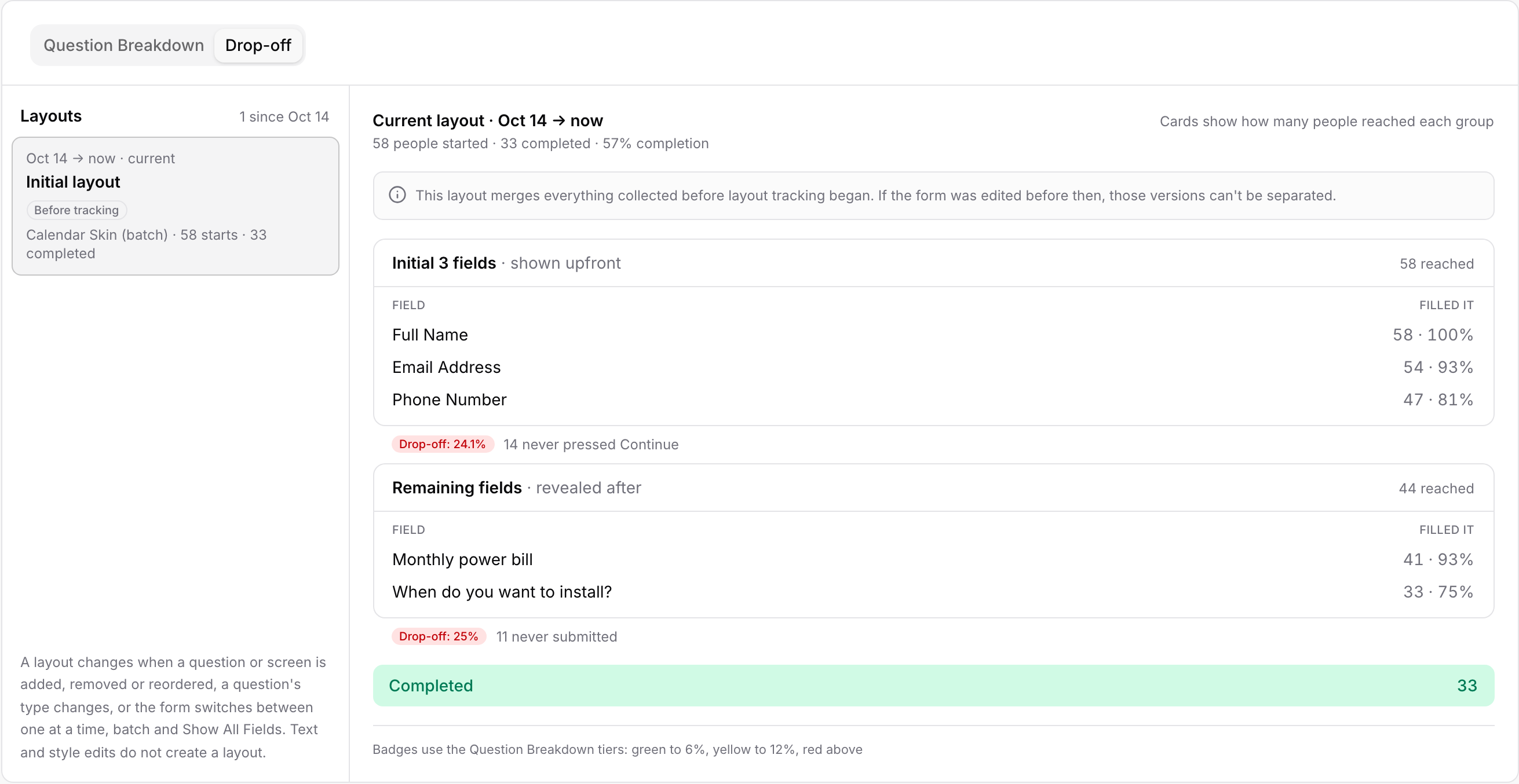
When a layout shows several fields at once (Calendar Skin in batch mode, or Show All Fields), the funnel is drawn as cards instead of bars: Initial N fields · shown upfront and Remaining fields · revealed after, or one All N fields · shown at once card. Each card lists its fields with FILLED IT: how many of the people who reached the card typed a valid value in that field, and the share of the card's visitors that is.
Under a card, N never pressed Continue is how many people reached it and never went on to the next card; N never submitted is the same for the last card.
A visitor is counted in the layout they loaded. If you publish a change while someone is halfway through, they stay in the layout they started on.
Question Breakdown shows every answer the form ever collected, across all layouts. Right after a structural change, read Drop-off for the new layout; the breakdown's all-time drop-off badges mix the old and new question lists.
A layout nobody has started yet shows No one started this layout in the selected range with a link to the previous one. A form that has never been published shows no layouts.
The Before tracking entry cannot be split into the versions you had before. Everything you publish from now on gets its own layout.
The lead behind every bar is in the Submissions tab, where you can filter by status and campaign; see Managing Leads and Submissions.