A partial submission is a visitor who gave you an email or phone number but did not finish the form. With Partial Submissions on, ROASForm saves them as leads, and once they stop interacting it pushes them to GoHighLevel with everything they answered so far plus an abandon tag, so your follow-up automations can bring them back. If they do finish later, the abandon tag is removed again.
Open the form and click the gear icon > Settings.
On the Integrations tab, make sure Integration is set to GoHighLevel. Partial submissions need a CRM on the form; until one is selected the toggle is greyed out with "Select a CRM integration in the Integrations tab first".
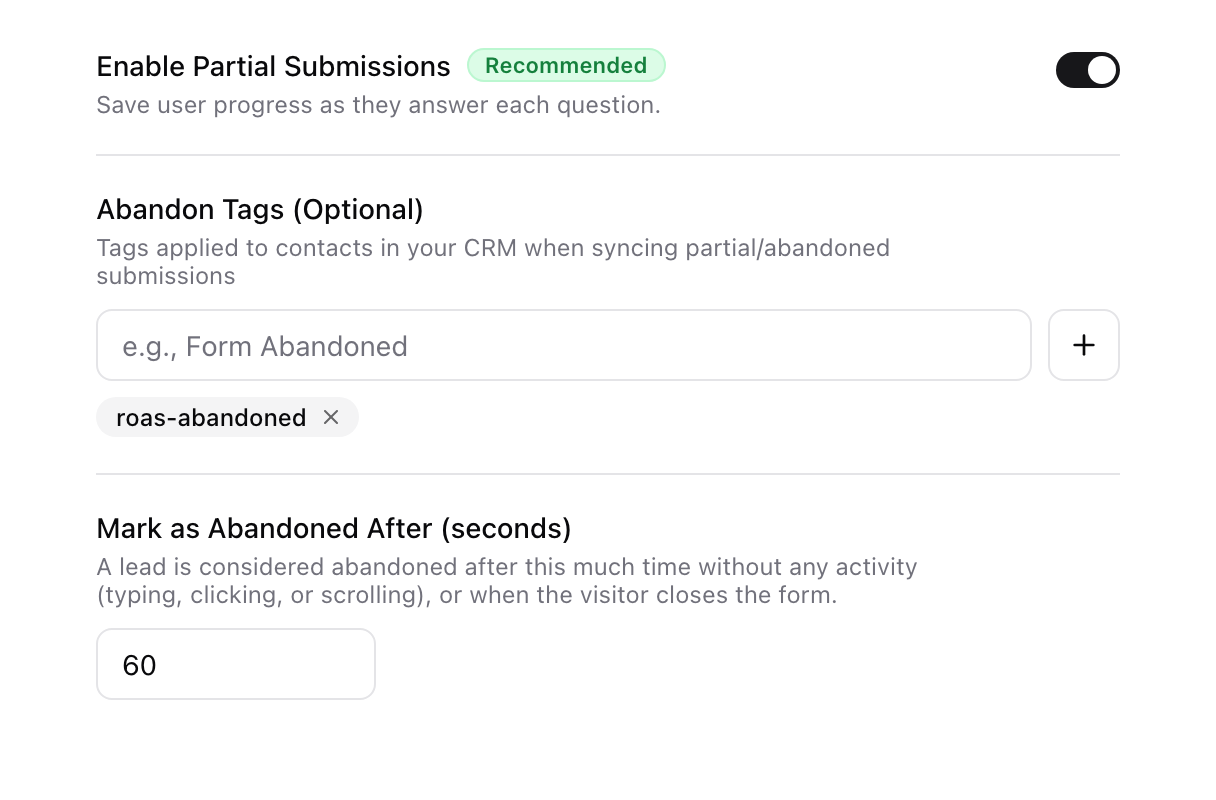
On the Form Settings tab, turn on Enable Partial Submissions. Selecting GoHighLevel already turns it on for you and adds the default abandon tag roas-abandoned, so most forms have this from day one.
Three settings control it:
Enable Partial Submissions: saves a lead as soon as a visitor enters a valid email or phone, and keeps saving their answers as they go.
Abandon Tags (Optional): the tags added to the GoHighLevel contact when the lead is pushed as abandoned. Default is roas-abandoned; add more, rename, or clear them.
Mark as Abandoned After (seconds): how long a visitor can stay inactive (no typing, clicking, or scrolling) before they count as abandoned. Default 60 seconds, minimum 10. A visitor who closes the tab is picked up by the server once this window has passed.
The visitor enters an email or phone. ROASForm creates the lead and a submission marked Partial. Every answer they give after that is saved too. Nothing is sent to GoHighLevel yet.
They keep going, or they don't. An inactivity timer runs in the visitor's browser. Any typing, click, tap, or scroll resets it.
They go idle past your limit. The form tells ROASForm the lead abandoned. Once the window has passed, ROASForm creates or updates the contact in GoHighLevel with everything answered so far and adds your abandon tags.
Safety net. If the browser never got to send that signal (they closed the tab, someone bounced in a few seconds, a phone froze the tab), a server-side check runs every minute and pushes any partial that has been idle longer than your limit plus about 30 seconds. Either way, the abandon is delivered within a minute or two of the visitor leaving.
They come back and finish. When the same session completes the form or books a call, the completion sync adds your ending tags and removes the abandon tags, so the contact is no longer flagged as abandoned. The only exception is a tag you also use as an ending tag, which stays.
The abandon push is a normal contact sync: email, phone, and name, Source = ROASForm, every answer that was already mapped to a GoHighLevel field (see Mapping Form Answers to GoHighLevel Custom Fields), the lead score so far if you pass scores to the CRM, and your abandon tags. Questions the visitor never reached are simply empty.
Build a workflow with the trigger Contact Tag Added and your abandon tag (roas-abandoned). Two recommendations:
Add a short wait (1 to 2 minutes) at the start, then an If/Else that checks the contact still has the abandon tag. A visitor who comes back and finishes has the tag removed, so this keeps you from chasing someone who already completed or booked.
Use different tags for different forms if you want different follow-ups; each form has its own Abandon Tags setting.
More on tags and triggers: How ROASForm Tags Work with GoHighLevel and How to Trigger GoHighLevel Automations from ROASForm.
Open the form's Submissions tab. Partial leads carry a Partial badge, and the Status filter lets you show only Partial or only Complete. The Leads card at the top shows both counts in its tooltip ("N completed • M partial"). Partial submissions do not count toward a free plan's submission limit; only completed ones do.
To confirm an abandon reached GoHighLevel, open Connect > Integrations, then the Logs tab: you will see the Contact sync row and a separate Tag addition row for the abandon tag.
No email or phone, no partial. Answers given before a contact field are kept once the contact field is filled, but a visitor who leaves before entering one is not a lead.
Returning visitors. Someone who completed the form last week and abandons a fresh attempt today is tagged abandoned again, just like a new lead. A late abandon signal from the same session that just completed is ignored.
Changing the timer. A shorter Mark as Abandoned After means faster follow-up but more "abandons" from people who were only reading a long question. 60 seconds is a sensible default; windows shorter than 60 seconds behave like about 60 seconds, because the server waits for 60 seconds of inactivity.
Turning it off. Switch off Enable Partial Submissions and no partial leads are captured or synced. Removing the CRM integration from the form turns it off automatically.

