First, find out where the lead actually is.
Not in ROASForm either? Then it is not a sync problem. The usual causes are a form that is still in draft, a test done through the preview link, or an email on your Blocked List. See Why aren't my submissions being saved?
In ROASForm but not in GoHighLevel? Keep reading.
Open the form's Submissions tab. Every row has a sync status; hover it for the reason (for Failed, open the submission to see GoHighLevel's own error).
Synced: the contact was created or updated in GoHighLevel. If you can't find it there, see "It says Synced but I can't find the contact" below.
Fields dropped: the contact is there, but some custom fields were not saved because they no longer exist in the connected location. Re-map them (see Mapping Form Answers to GoHighLevel Custom Fields) so the next submissions save every field, then use the sync button on the row to resend this lead.
Processing: a partial submission waiting for the visitor to count as abandoned, or a sync that is queued. Give it a few minutes. See Partial Submissions and Abandon Tags for the timing.
Not Synced: it will not sync on its own. The hover text tells you why: no CRM integration on the form, no valid email or phone, it was submitted before the integration was connected, or a contact was collected but partial submissions were off. Each case is covered below.
Failed: GoHighLevel rejected the request. Open the submission to see GoHighLevel's own error; the Integration Logs have the full request and response.
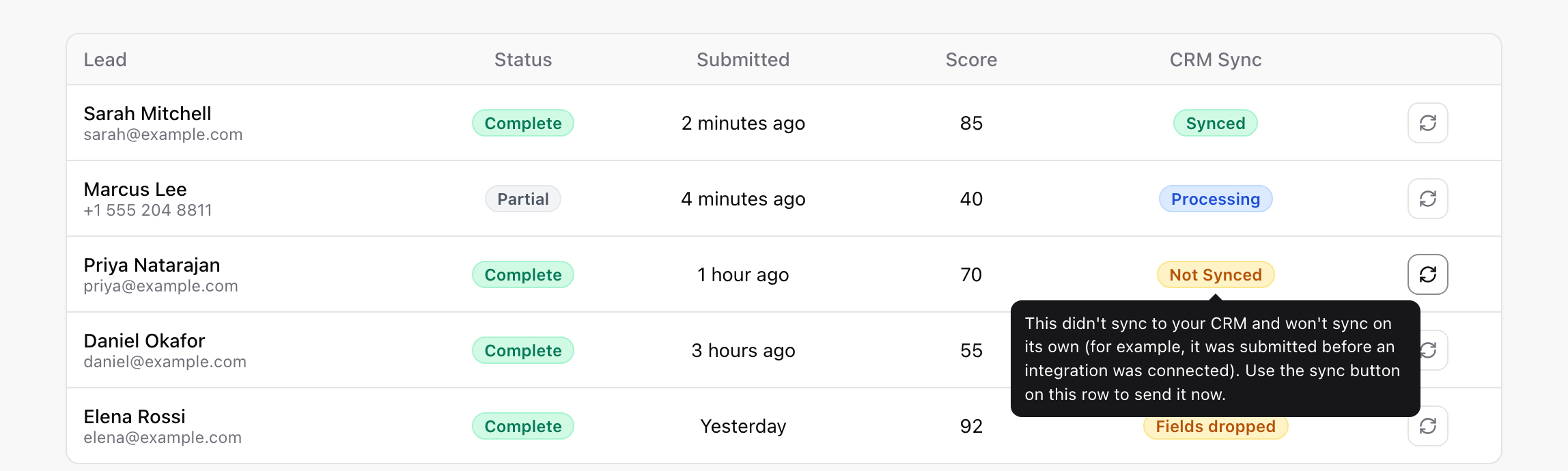
Connecting GoHighLevel under Connect > Integrations is not enough; each form also has to be pointed at it. Open the form, go to the gear icon > Settings > Integrations tab and set Integration to GoHighLevel. Leads that arrived before you did this show Not Synced; push them with the sync button on each row.
If GoHighLevel revoked ROASForm's access (password change, app removed, permissions reset), the Integrations page shows a banner such as "Authentication expired. Please reconnect your GHL account" or "The connection stopped working. Reconnect to restore syncing." Every sync stops until you click Connect on the GoHighLevel card and sign in again. Afterwards, resend the affected rows with the sync button.
GoHighLevel needs at least one of them to create a contact. ROASForm drops a malformed email (someone typing "none" into the email question) or a phone number with too few digits rather than let GoHighLevel reject the whole contact. If neither is valid, nothing is sent and the badge says Not Synced, and its hover text says "No valid email or phone to sync". Fix: make your Email or Phone question required, and use the Phone question type so the number is validated as the visitor types.
Partial leads are only pushed to GoHighLevel once the visitor goes idle (60 seconds by default). Until then the badge reads Processing. This is expected, not a failure.
Wrong location. Each ROASForm subaccount syncs to one GoHighLevel location; the Integrations page shows its name and Location ID. Make sure you are searching in that one.
Merged into an existing contact. ROASForm matches by email or phone, so a returning lead updates their existing contact instead of creating a new one. Search by email.
Phone format. Numbers are stored in international format (+1 555 ...). Searching "555-1234" may miss; search by email or the last digits.
A smart list filter is hiding it. Check the plain Contacts list with no filters.
Empty custom fields: the question is not mapped, or the mapping points at a field that no longer exists (badge "Fields dropped", or "Needs re-map" on the question). Re-map it so the next submissions save the field, then resend this lead with the sync button on its row.
Missing tags: ending tags are added only when the form is completed, abandon tags only when the lead abandons. See How ROASForm Tags Work with GoHighLevel. In the Integration Logs, tags appear as their own Tag addition rows, separate from the Contact sync row.
Timeouts and rate limits show up in the Integration Logs as Server error, Timeout, or Retried. ROASForm retries these on its own with increasing delays; you only need to act if the submission ends as Failed.
Emails and domains on your Blocked List, and temporary-email providers if you block them, never become leads; the visitor sees "This email address can't be used." Check Settings → Blocked List if a real prospect reports being rejected.
Open Connect > Integrations, then the Logs tab (or the form's Integration logs tab), search for the lead's email or phone, and click the Contact sync row. A 401 or 403 means the connection needs reconnecting; a 400 or 422 means GoHighLevel rejected a value, and the error message names it; Tag addition rows tell you whether tags went through. Details in How to Use Integration Logs.
After fixing the cause (reconnecting, selecting the integration, re-mapping), use the sync button on the submission's row (also available on appointments) to push that lead to GoHighLevel now. The sync button shows on rows marked Not Synced, Failed, or Fields dropped. It runs the same sync as a fresh submission, tags included.
Send us the form name, the lead's email, roughly when they submitted, and the Response from the Integration Logs (there is a Copy button on it). With those we can usually tell you the cause in one reply.

