On the Free plan you get 50 completed submissions a month. That's one allowance for your whole account — every form you have shares the same 50, not 50 per form. Testing your own form is the fastest way to use those up by accident, so it's worth knowing which tests count before you start.
Solo and Agency have no submission cap, so none of this applies to you if you're on a paid plan.
| Counts toward your 50 |
A submission you complete on the published form | Yes |
A submission someone abandons partway (a partial) | No |
Anything you do in the builder preview | No |
So: test in the builder preview as much as you like — it never counts. The moment you fill in the published form and reach an ending, that's a real completed submission, whether it was you or a customer, and it counts against your 50.

Use the builder preview. This is the only way to test for free. It checks everything except the integrations above, and it never touches your 50.
If you have to test the live form — to confirm a real sync, booking, or conversion event — keep it to a couple of completions. Those do count, and there is no way to un-count them (see below).
Testing on a clone doesn't help with the limit. You can clone a form to keep your real one clean, and the clone's own submission count starts at zero. But the 50 is counted across your whole account, so a completed test on the clone uses up the same allowance as one on the original. A clone changes which form holds the data, not how much allowance you have left.
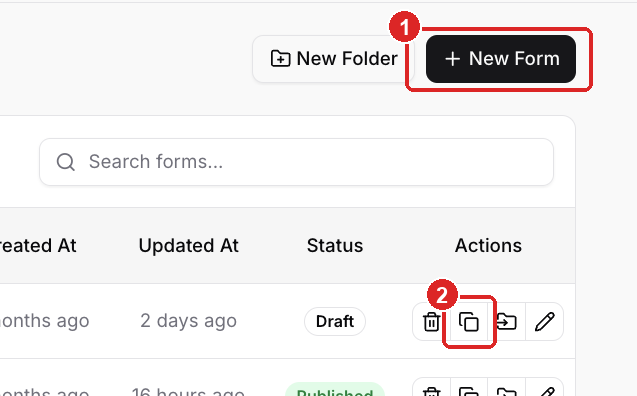
+ New Form
Clone — on the forms list, in each row's Actions (copy icon, between delete and move)
You can delete submissions. Open the form's Submissions tab, select the test rows, and delete them — one at a time or in bulk.
What deleting does not do is give the allowance back. The 50 is a running monthly tally, not a live count of the rows in your account, so removing submissions cleans up your data but your used count stays where it is. Deleting is for tidiness, not for freeing up room.
The count resets on its own at the start of each month (UTC) — the used number goes back to 0 and you have the full 50 again. If test submissions used up your month and you can't wait for the reset, you have two options:
Upgrade to Solo or Agency, which have no submission cap.
Ask support to reset the current month's count. This is the only thing that clears the counter before the monthly reset, and only support can do it.
See How to Reset Form Stats and Analytics for what you can and can't reset today.