

A subaccount is a workspace. It holds its own forms, leads, split tests, analytics, integrations, team, and blocked list, and it connects to exactly one GoHighLevel location. Most people use one subaccount per client (or per brand). Nothing crosses between subaccounts unless you look at the Agency View.
Switching subaccounts
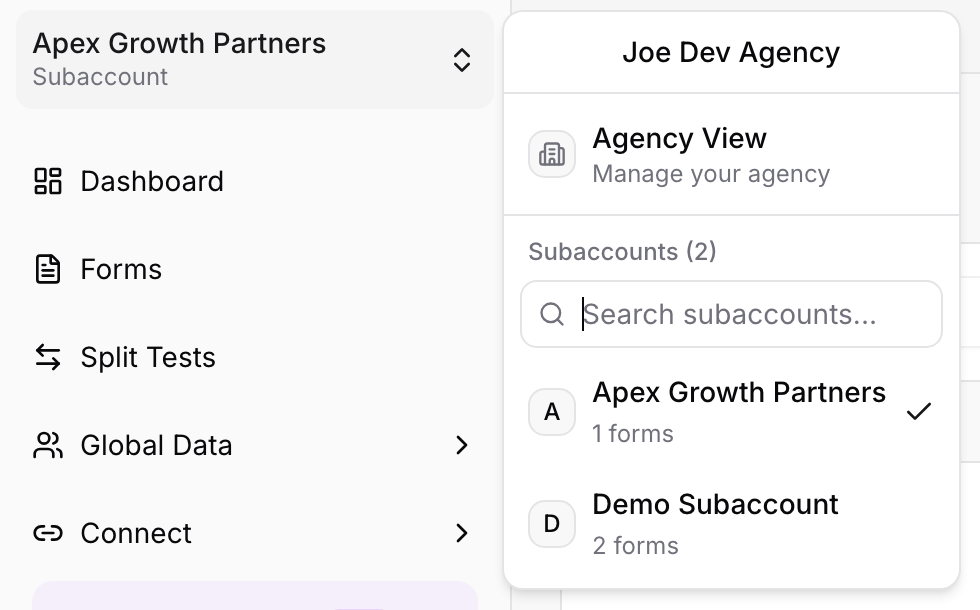
Click the workspace name at the top of the sidebar. The switcher lists every subaccount you have access to with its form count; pick one and the whole dashboard switches to it. There is a search box for long lists.
The Agency View
The first entry in the switcher, Agency View, steps up one level to manage the agency itself:
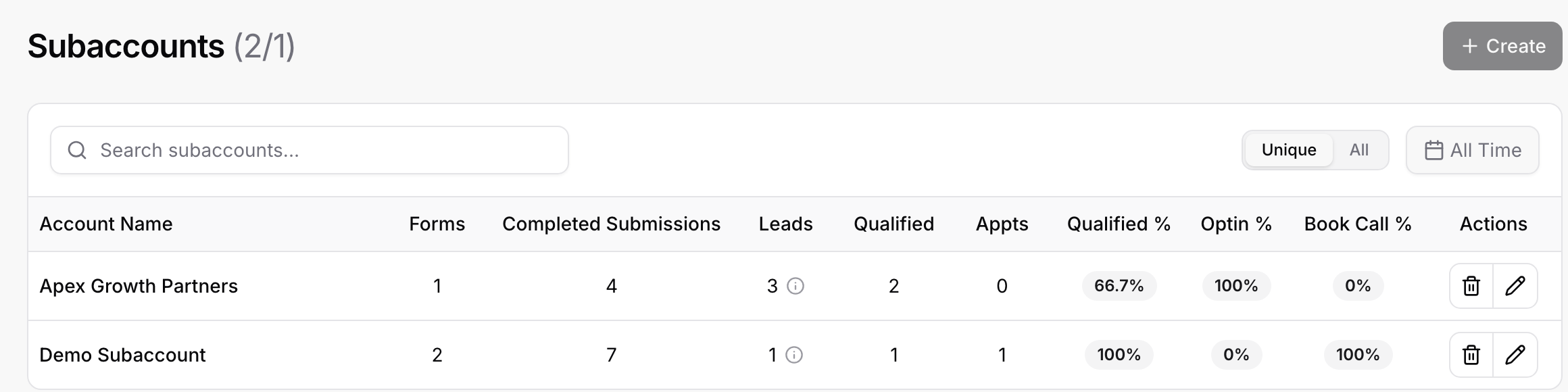
Subaccounts: every subaccount in a table with forms, completed submissions, leads, qualified leads, appointments, and the qualification, opt-in, and booked-call rates, switchable between unique and all counts and filterable by date. This is your client overview. Create adds a subaccount; the pencil renames it; the trash deletes it together with everything inside it.
Agency Team: agency-wide admins; see Inviting Team Members and Roles.
Billing also lives here, since it belongs to the agency, not to a client.
Creating a subaccount
In the Agency View, click Create, give it a name (usually the client's business name), and it appears in the switcher immediately. Then, inside it, connect its GoHighLevel location under Integrations and build or duplicate forms into it.
How many subaccounts you can have depends on your plan: the Free and Solo plans include one, the Agency plan removes the limit. The counter next to the Subaccounts title (for example 2/1) shows how many you have against your allowance; if you are over it after a downgrade, the extra ones are read-only until you resubscribe.
Moving things between subaccounts
Forms belong to the subaccount they were created in. To reuse a form for another client, open the Forms list, choose Clone on the form, give the copy a name, and pick the target subaccount in the Clone Form dialog. The copy lands in that subaccount; reconnect its integrations there, and re-select any custom-field mappings, because the other GoHighLevel location has different fields.
Good to know
Team members are invited per subaccount; agency admins see all of them.
The Blocked List is per subaccount too, so a block for one client does not affect another.
Deleting a subaccount deletes its forms, leads, and submissions. Export what you need first.