A check that did not produce a result is not always a problem. X-Ray records an outcome for every check it attempts, and most skips are it working as designed. Nothing below costs you anything: you are only charged when a result comes back.
X-Ray > History > Lookup History. Find the row with X-Ray Finance in the Product column. Hover the badge in the Status column to read the reason.
The contact's X-Ray tab. The card explains what happened in a sentence. The X-Ray badge next to the contact's name summarises it: Running, No result, Skipped, Declined, Opted out or Not run.
All Statuses in Lookup History filters the list to one outcome, which is the quickest way to tell whether you have one odd lead or a pattern.
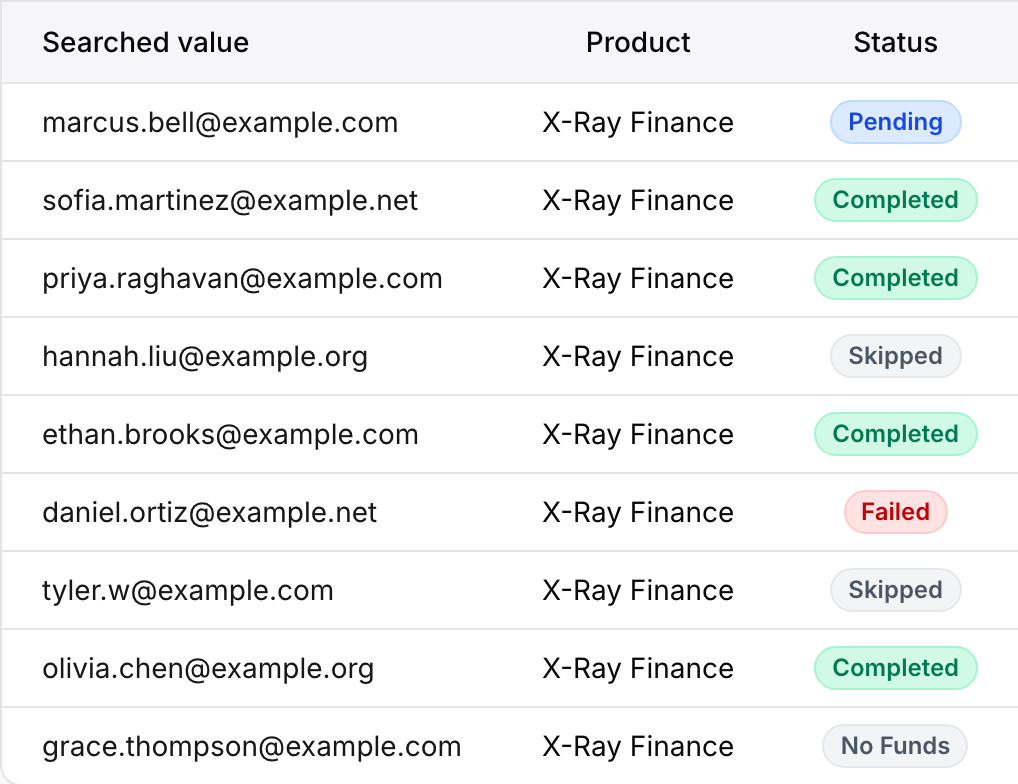
The statuses on an X-Ray Finance row are:
Pending: queued, or waiting for its one retry. It settles on its own.
Completed: a result came back. This is the only status that is charged.
Failed: no result. The reason says why. Not charged.
Skipped: the check was not run. The reason says why. Not charged.
No Funds: your wallet did not cover the check. Not charged.
Your X-Ray subscription is not active.
The reason reads "Your X-Ray subscription is not active." Check Billing (click your name in the top right corner, then Billing). A subscription that is past due keeps running for a 14-day grace period, with a note on the X-Ray pages pointing to Billing. After that, or if the subscription was cancelled, checks pause until it is active again. Funds you added are kept while it is paused. See X-Ray Plans, Wallet, and Top-Ups.
Your wallet is empty.
The status reads No Funds and the reason reads "Not enough funds in your X-Ray wallet." X-Ray tries one auto-recharge first if you have it on. Otherwise add funds, or raise your auto-recharge cap. Skipped leads are not retried when you top up, so a lead who arrived while the wallet was empty stays skipped. Turning on auto-recharge avoids this.
A check needs a first and last name, an email, and a US phone number. X-Ray Finance turns on the form questions it needs and locks them, but a visitor can still type only one name, or a number from another country. The reason lists what was missing:
"Missing last name." or "Missing first name.": the name was a single word.
"Missing email." or "Missing phone number."
"The phone number is not US.": the check only takes US numbers.
Several at once read like "Missing email; the phone number is not US."
"The lead has no valid email or phone.": neither was usable, so nothing could be looked up. On the contact, the badge reads Not run and the card says "This contact has no usable email or phone number to look up."
There is nothing to fix on your side after the fact. To get fewer of these, keep the name question set to ask for a full name, and make the phone question clear that you need a US number. Anyone who submits again with complete details is checked as normal.
No consent.
On the contact, the badge reads Declined and the card says "This contact did not agree to the data lookup on the form, so X-Ray will not run for them." In History there is usually no row at all, or a Skipped row that reads "Consent not given." For X-Ray Finance, submitting the form with the Privacy Notice shown is the consent, so the usual cause is that the visitor's browser sent a Global Privacy Control signal. That signal stops the check. The form still submits and you still get the lead. You cannot override it, and the contact page does not label it separately. See X-Ray, Consent, and Your Visitors' Privacy Choices.
The person opted out.
The reason reads "The contact opted out." The person used Your Privacy Choices on the form footer, and X-Ray will not check them again for any form in your agency. On the contact, the badge reads Opted out and the card says "This contact opted out of X-Ray through Your Privacy Choices, so X-Ray doesn't check them." Nothing to fix.
Already checked.
The reason reads "This lead was checked in the last 14 days." On the contact, the card says "This contact was checked in the last 14 days, so X-Ray Finance was not run or charged again." This protects you from paying twice for someone who fills in two of your forms in the same fortnight. Only a check that returned a result counts. A check that failed or was skipped does not block the next one.
A check was already running.
The reason reads "A check for this contact was already running." Two submissions arrived close together and the first check covers both.
One check per submission.
A check that ran at a step in the form is not bought again when the form is submitted.
The rule was turned off.
The reason reads "The rule was turned off before this ran." Someone switched the rule off, or removed the form from it, between the submit and the check.
X-Ray Finance was turned off for the form.
The reason reads "X-Ray Finance was turned off before the retry, so it wasn't sent." Same idea, for a check that was waiting to retry.
If a lead has no X-Ray row, no check was ever started, so there is no message to read. The usual causes:
No rule covers the form. Turn on X-Ray Finance from the form builder's X-Ray button, or add the form to a rule on X-Ray > Rules. See Auto-Lookup Rules: Deciding When X-Ray Runs. On a form covered by a rule for all forms, the builder says "A rule for all forms runs X-Ray Finance here."
The rule's trigger is Off.
The lead arrived before the rule existed. Rules apply to new leads only. They do not backfill.
X-Ray is not turned on for the account. The contact's X-Ray tab shows "X-Ray is not turned on".
On the contact, the card for these cases usually reads "X-Ray has not run for this contact yet" or "X-Ray runs automatically on new leads that match your rules." A lead from a form with no X-Ray rule can also show Declined, because X-Ray consent is only recorded on forms that run X-Ray.
When a check ran but gave no result, the status is Failed (the contact badge reads No result) and the reason reads one of these. All of them end with a note that nothing was charged.
"The credit provider couldn't process this contact with the details provided. No charge was made." The details did not match a credit file. A typo in the name, or a name that does not match the phone number, is the usual cause.
"The credit provider didn't respond. No charge was made." A temporary service problem that did not clear after the retry.
"The credit provider received the same request less than a minute earlier. No charge was made."
"The credit provider returned no usable data. No charge was made."
"The credit provider returned an error. No charge was made."
"The check was interrupted before a result came back. No charge was made."
"The check couldn't be started. No charge was made."
"The check couldn't be completed. No charge was made."
"Another check for this contact was starting at the same time. No charge was made."
"The contact's details changed before the retry, so it wasn't sent. No charge was made."
"X-Ray Finance pricing isn't set up for this account. No charge was made." Contact support: this is a setup problem on our side.
If the credit provider does not answer, or tells X-Ray it saw the same request seconds ago, X-Ray does not fail the check straight away. The row stays Pending (the contact shows Running) and a single retry is made about 90 seconds later, sending exactly the same details. If the contact's details changed in between, the retry is not sent. If the retry fails too, the row turns Failed with a reason from the list above. There is no third try.
When your form uses Routing Leads with X-Ray Finance in Logic, the check runs while the visitor is still filling the form, and the button reads Checking....
A slow check is not waited on for long. A visit waits up to about 10 seconds in total. If no result is back, the X-Ray condition counts as not met and the next Logic rule runs.
The check carries on after the visitor has moved on. It is charged only if a result comes back, and it scores the submission if it finishes in time.
One attempt per submission. If the check at one step ended without a result, later steps of the same visit do not try again.
A step with missing details runs no check. Nothing appears in History for that step. The submit tries again, and its row shows the reason.
There is no Run again button in History and no run button on a contact. See Can I Run X-Ray on a Lead by Hand?.
Credit Freeze is one of the result fields you can map to your CRM. It is not a reason for a check to be skipped.
If everything is skipping at once, look at the account first, not at individual leads. A lapsed subscription, an empty wallet or a rule switched off explains a whole page of skips.

