X-Ray never runs on its own. A rule tells it where to run and when. No rule means no checks and no charges.
A rule belongs to one subaccount and answers three questions:
When does a check run? (the trigger)
Which forms does it cover? (all forms, or the ones you pick)
What does it run? (X-Ray Finance, with or without the debt to income and income add-on)
Each lead who submits a covered form gets one X-Ray Finance check. You are charged only when a result comes back. See X-Ray Plans, Wallet, and Top-Ups for the price shown on your plan.
Open X-Ray > Rules inside a subaccount. In the agency view the page only says "Global rules are coming soon", so pick a subaccount in the sidebar first.
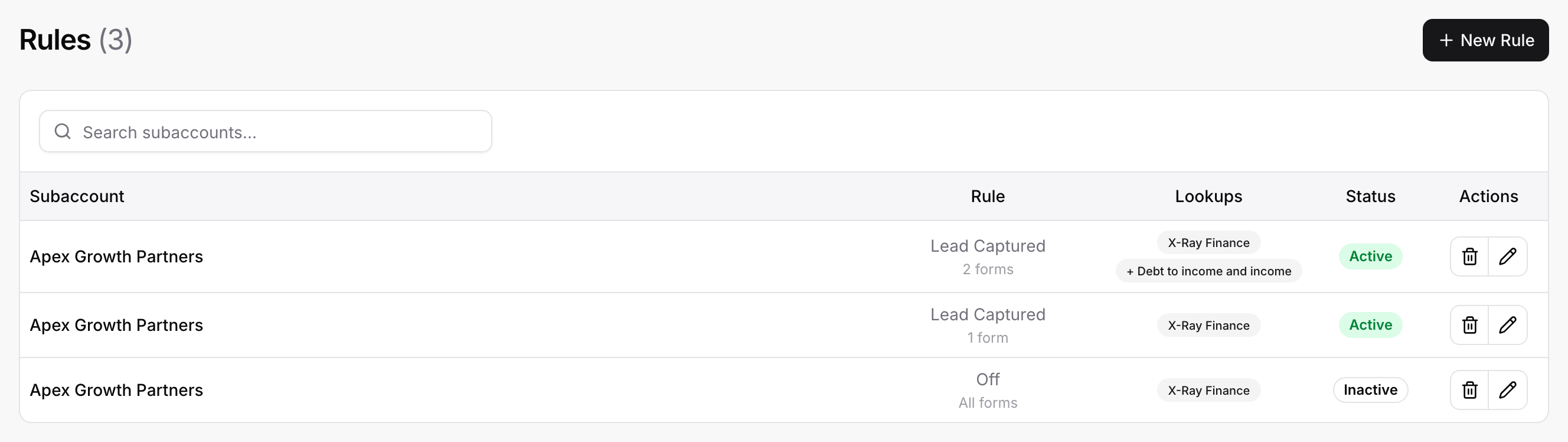
The page title shows how many rules you have, for example Rules (2). Each row has these columns:
Subaccount: The subaccount the rule belongs to. A subaccount can have several rules.
Rule: The trigger (for example Lead Captured), and under it All forms or a count such as 2 forms.
Lookups: A badge per thing the rule runs: X-Ray Finance, and + Debt to income and income when the add-on is on.
Status: Active or Inactive.
Actions: A pencil to edit and a trash can to delete.
Use Search subaccounts... to filter the list.
Open X-Ray > Rules in the subaccount.
Select New Rule.
Leave Trigger on Lead Captured.
Under Apply to, choose All forms or Specific forms (see the next section).
Check the lookup switches. X-Ray Finance is on for a new rule. The Debt to income and income switch appears only if your plan includes the add-on.
Select Create. You see Rule created.
The dialog warns you that the rule takes effect immediately:
"This rule takes effect immediately. New leads in this subaccount are looked up automatically and charged to your X-Ray wallet."
If Create is greyed out, hover over it. It tells you what is missing, for example "Choose at least one form." or "Turn on at least one lookup, or this rule will not run."
X-Ray Finance needs a US phone number. The switch says so:
"US phone numbers only; leads without one are skipped."
The trigger decides when the check starts.
Lead Captured: When a lead submits the form.
Off: Never. Use it to pause a rule without losing its setup.
Checks that start from a Logic rule (see Routing Leads with X-Ray Finance in Logic) show During the form as their trigger in X-Ray History. They need an active rule that covers the form and runs X-Ray Finance.
Under Apply to you choose:
All forms: every form in the subaccount, including forms you create later.
Specific forms: tick the forms you want. Use Search forms if you have many. You must tick at least one, or the page says "Select at least one form, or choose "All forms"."
Be careful with All forms. Every new form starts costing you per result as soon as it gets leads.
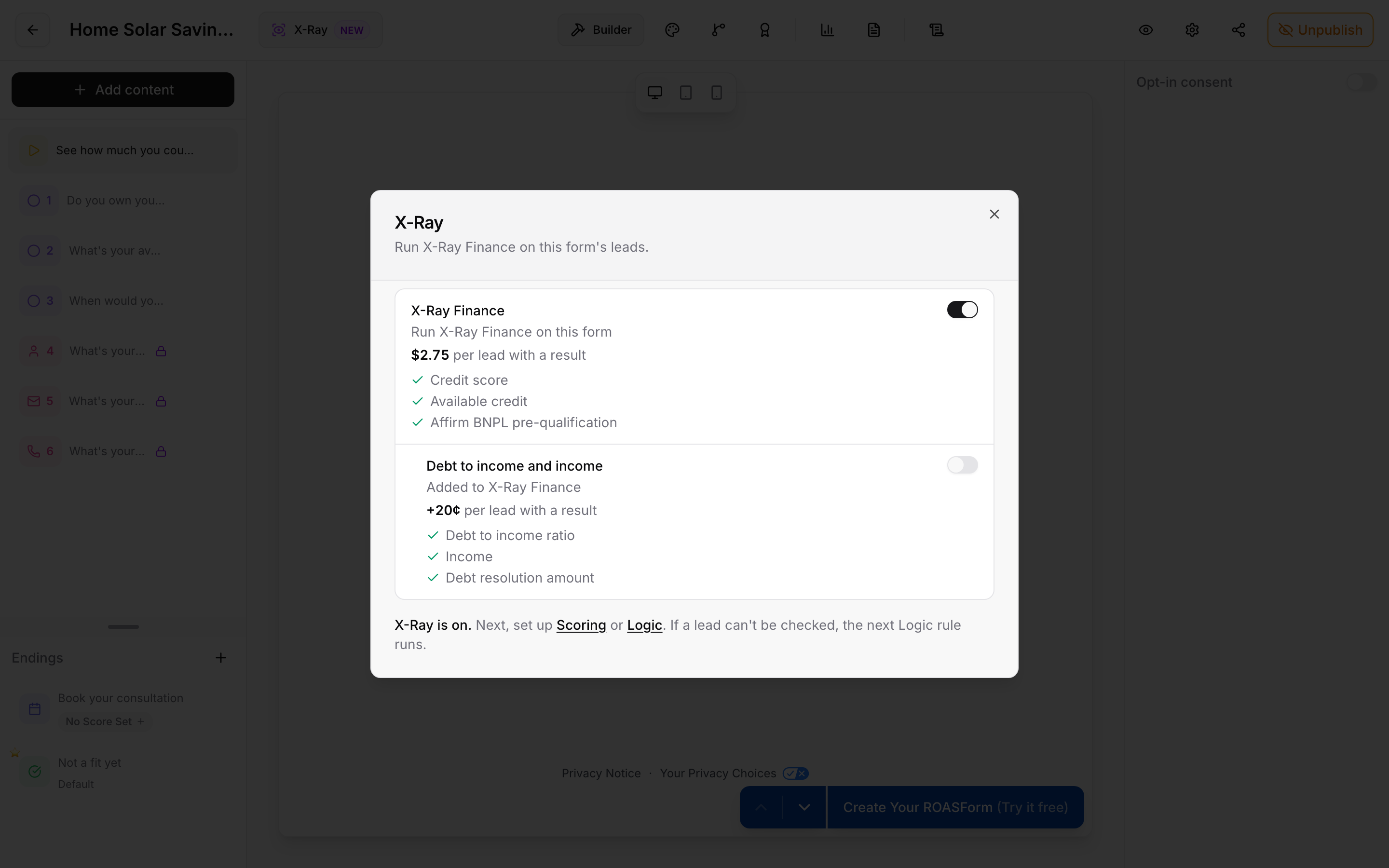
You do not have to open the Rules page to cover a form. In the form builder, select X-Ray in the header. The panel is titled X-Ray and says "Run X-Ray Finance on this form's leads."
Switch X-Ray Finance on.
Optionally switch on Debt to income and income (shown when your plan includes it).
Follow the prompt to open Scoring or Logic if you want to use the results.
The panel and the Rules page are two views of the same thing. A form's switch does not store anything on the form. It adds the form to a rule, or removes it:
Switching a form on adds it to an existing Lead Captured rule that lists specific forms and runs the same lookups. If there is none, X-Ray creates a new rule for that form alone.
Switching a form off takes it out of the rules that list it. A rule left with no forms is deleted, because an empty list would mean "all forms".
If a rule for All forms already covers the form, the switch is locked and the panel says "A rule for all forms runs X-Ray Finance here. Change it in Rules." Change that rule on the Rules page.
If your X-Ray setup is not finished, the panel lists what is missing under Finish X-Ray setup to turn this on: and offers Finish setup. Team members without access see "Ask your agency owner to finish X-Ray setup." See Turning X-Ray On.
The check reads the lead's name, email and phone. While X-Ray Finance runs on a form, the form must ask all three as required, visible questions. ROASForm handles this for you:
When you turn X-Ray Finance on, it adds the questions that are missing (a Name, an Email and a Phone question), makes existing ones required, and shows hidden Contact Card fields. A message tells you what it did, for example "Added a phone question for X-Ray Finance."
The Name question asks for a full name. In the question's settings, Require full name is on and cannot be switched off. It explains: "On while X-Ray Finance runs on this form: it needs a first and last name."
These questions are locked. You cannot delete them, hide them, make them optional or change their type. A locked question shows "Required while X-Ray Finance runs on this form." If you try, you see "X-Ray Finance needs a required Name question. Turn X-Ray Finance off to remove it."
You cannot publish the form while one is missing. You see "X-Ray Finance needs required Name, Email and Phone questions."
A Contact Card counts. Its Name, Email and Phone fields satisfy the requirement as long as they are required and not hidden.
If you add a second required question of the same kind, for example two Email questions, neither is locked, because either one could cover the check.
Turn X-Ray Finance off for the form and the questions unlock. They stay on the form until you remove them.
Each lead submission gets at most one X-Ray Finance check, however many rules cover the form:
If a Logic rule already ran the check while the lead was filling in the form, that check is used. The submit does not buy another.
If two rules cover the same form, the second one is skipped. History explains why, with reasons such as "a check for this contact was already running".
A lead who was already checked in the last 14 days is not checked or charged again. The earlier result is reused.
Sometimes the credit service does not answer, or has a short problem. X-Ray asks once more, at least 90 seconds after the first try. While it waits, the lookup shows as Running and counts as a check in progress.
If the second try also fails, the check ends with no result and no charge. If you turned X-Ray Finance off for the form before the retry was due, the retry is not sent.
Select the pencil (Edit) on the rule's row.
Change the trigger, the forms or the lookups in Edit Rule.
Select Save. You see Rule saved.
To pause a rule, set its trigger to Off. Turning a rule off is always allowed. Saving a rule that is switched on needs the current X-Ray Terms of Service to be accepted, and the dialog says "Accept the updated X-Ray Terms of Service first." if they are not.
To delete a rule, select the trash can (Delete), tick I understand that this action is permanent and confirm. Its automatic lookups stop. Any other rules on the subaccount keep running.
Switching X-Ray Finance off in a rule also switches off the add-on, and switching the add-on on turns X-Ray Finance on. The add-on only runs with X-Ray Finance.
The dialogs show a note under the switches: "A contact looked up in the last 14 days is not looked up or charged again, unless they submit an email or phone that was not tried yet."
If a lookup did not run, Why an X-Ray Lookup Did Not Run lists the reasons.
A check needs the lead's consent, which comes from submitting with the Privacy Notice shown in the form footer. See X-Ray, Consent, and Your Visitors' Privacy Choices.

