Logic can use more than answers. With X-Ray Finance, a rule can look at the lead's credit result and send them on: a strong score to your calendar step, everyone else to a different ending.
X-Ray Finance must run on the form. Switch it on from the X-Ray button in the form builder. See Auto-Lookup Rules.
The form needs required Name, Email and Phone questions. Turning X-Ray Finance on adds any that are missing.
Save the form first. The X-Ray Finance group is not offered on a form that has never been saved.
The lead must have answered Name, Email and Phone before the question that carries the rule. The check runs when they leave that question, with what they have typed so far.
Open the form and go to the Logic tab.
Find the question the lead will leave when the check should run, and select Add logic. This creates a first rule. Select Add rule for more.
In the first box of a condition, open the list. At the top is a group named X-Ray Finance, above the Questions group.
Pick what to check. See the list below.
Pick the operator, then type the number (or two numbers for a range).
Under Then, pick where matching leads go: a question or an ending.
Optionally set All other cases go to. It defaults to Next question.
The group carries this note:
"Checked when they leave this question. If no result comes back in time, it isn't met."
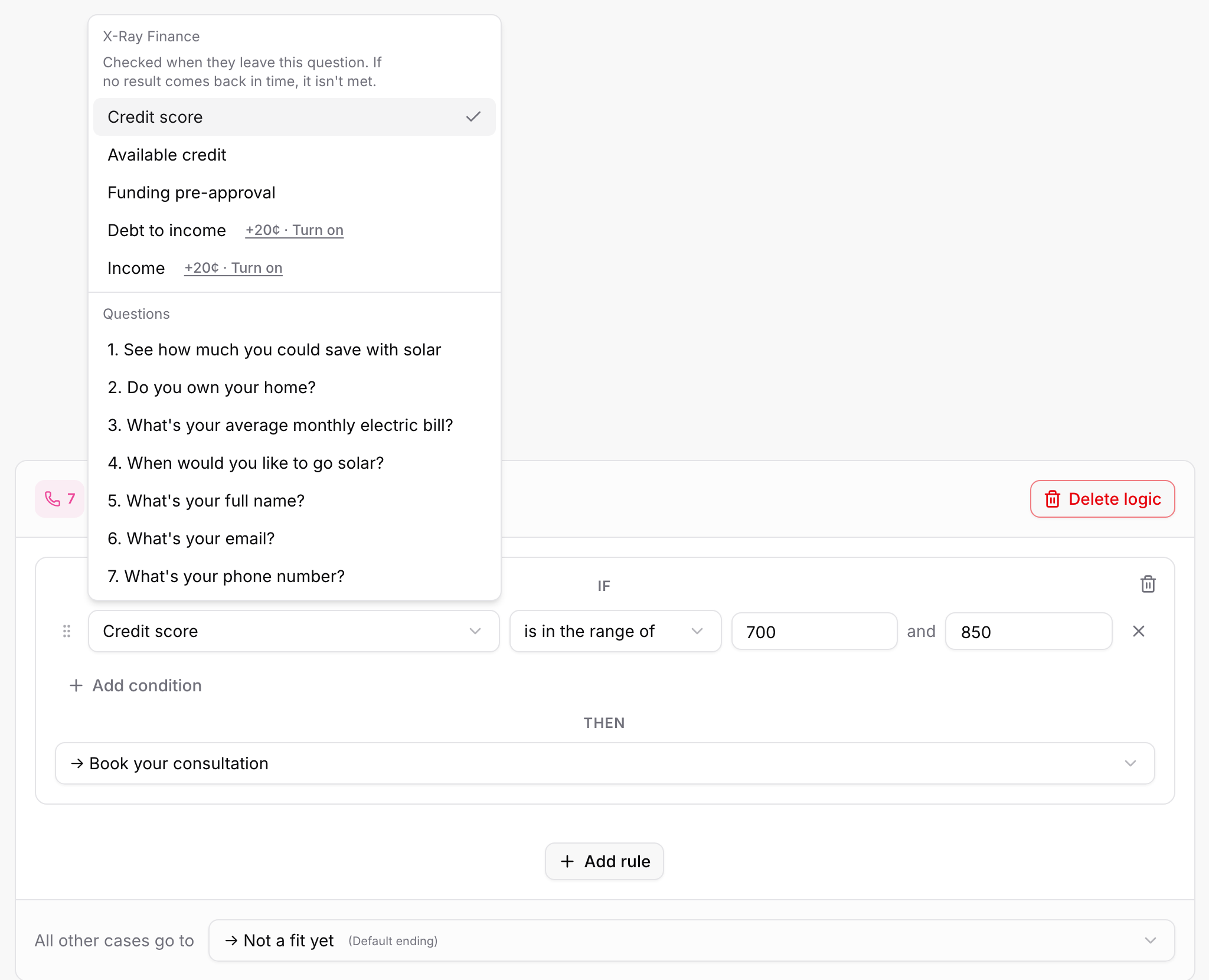
Credit score: A score. The box shows "300 to 850".
Available credit: Dollars.
Funding pre-approval: Dollars.
Debt to income: A percent. Needs the add-on.
Income: Dollars. Needs the add-on.
Debt to income and Income show Turn on beside them until the debt to income and income add-on runs on the form. Selecting them then opens the X-Ray panel so you can switch it on. If X-Ray Finance itself is off for the form, picking any of these opens the X-Ray panel too, and nothing changes in the rule.
is at least: The number or more.
is at most: The number or less.
is in the range of: Between two numbers, both included. You type a Min and a Max.
Credit score starts on is in the range of. The other sources start on is at least. You can mix X-Ray conditions with answer conditions in one rule, using and or or and groups like any other rule.
If you leave a number blank, the rule shows "Enter a value, or this condition is never met."
Send leads with a credit score from 700 to 850 to your calendar step, and everyone else to a "not a fit" ending:
On the Phone question (or the last contact question), select Add logic.
In the rule's condition: Credit score, is in the range of, Min 700 and Max 850.
Then: your calendar question.
All other cases go to: your "not a fit" ending.
When the lead presses the button on that question, ROASForm checks their credit before moving on. The button reads Checking... and cannot be pressed twice. On a Chat Bot form the bot shows its typing indicator instead. When the answer is in, the lead goes to the question or ending your rule picked.
The lead's browser never receives the credit score, your thresholds or which condition matched. It only learns where to go next.
A lead waits at most about 10 seconds in total on one visit, shared across every X-Ray step they pass. The server also uses what is already known:
If the lead was checked in the last 14 days, that result is used at once, with no new charge.
If a check for them is already running, the step waits for it, up to the limit.
If no result arrives in time, or the check cannot run, the X-Ray condition counts as not met. This applies to every X-Ray condition, including "is at most". A missing credit score never counts as a low score.
The lead is not stopped. The rules on that question are read in order and the first rule whose conditions hold decides where they go:
A rule that does not depend on X-Ray alone can still match. For example, a rule that joins an X-Ray condition and an answer condition with or matches on the answer.
If no rule matches, All other cases go to applies.
If that is not set, the lead continues to the Next question.
So put a sensible fallback in All other cases go to. It is where leads land when X-Ray gives no answer. If a lead's browser cannot reach ROASForm for the check, they follow the same path.
Reasons a check may not run include a browser privacy signal from the lead, an opt-out, missing contact details, or an empty wallet. See Why an X-Ray Lookup Did Not Run.
A check that is too slow is not thrown away. It keeps running after the lead has moved on. It is charged only if a result comes back, and the result still counts for scoring and for your CRM. After a temporary error X-Ray asks once more, at least 90 seconds later. A step never waits for that retry.
Within one visit, once a check has ended without a result, later steps do not buy another one.
One check per submission. A check that ran at a step is not bought again when the lead submits the form.
Charged on a result only. No match, no result, no charge. See X-Ray Plans, Wallet, and Top-Ups.
CRM right away. When a step's check returns a result, it is sent to your CRM as soon as it is in, not when the lead finishes the form. See Sending X-Ray Data to GoHighLevel.
History. These checks appear in X-Ray History with the trigger During the form.
An amber warning appears above a question's rules when something stops X-Ray from working:
"X-Ray Finance is off for this form, so X-Ray conditions are never met." Switch X-Ray Finance on in the X-Ray panel.
"The add-on is off for this form, so debt to income and income conditions are never met." Switch on the add-on in the X-Ray panel.
"X-Ray needs Name, Email and Phone answered before this question." Move the rule to a later question, or move the contact questions earlier. A Contact Card counts as answered together, so a rule on a card field can use the whole card.
Inside the picker, X-Ray sources are greyed out with the same order message when the contact questions come after the question. The order warning does not appear on forms that collect every answer at once and run the check at the final submit.
Test on the live form. The preview in the builder does not run checks, so X-Ray conditions are never met there.
Forms that jump only to endings. On layouts where logic can only send a lead to an ending, only your ending rules apply.
Consent. The check relies on the lead submitting with the Privacy Notice in the form footer. See X-Ray, Consent, and Your Visitors' Privacy Choices.
Scoring. If the form is scored on X-Ray Finance, the check also runs at the last Name, Email or Phone question. See Using X-Ray Finance in Lead Scoring.

