An X-Ray Finance check is a soft credit pull. It does not affect the lead's credit score. It returns a small, focused set of numbers you can use to qualify and route leads. This article lists each one, so you know what you can read on the contact, score on, route on and map into your CRM.
X-Ray Finance runs only when it has what it needs from the lead:
A first and last name.
An email address.
A US phone number. Numbers from other countries are skipped, and a skipped check is not charged.
The lead's agreement, given by submitting the form with the Privacy Notice shown. See X-Ray, Consent, and Your Visitors' Privacy Choices.
These come back with an X-Ray Finance check when the credit service has them for the lead.
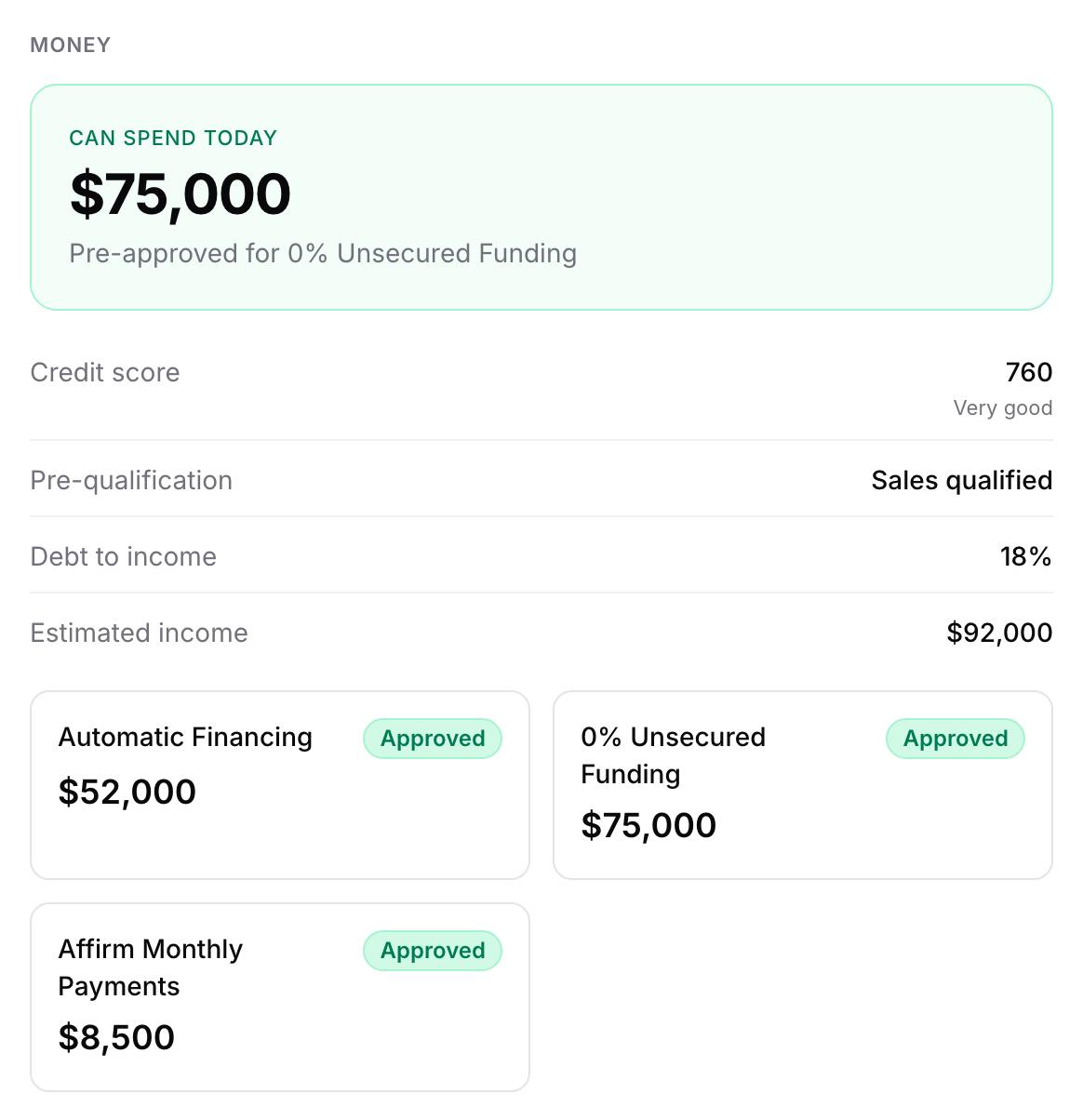
Credit score: the lead's credit score, from 300 to 850. On the contact it appears with a band: Exceptional (800 and up), Very good (740 to 799), Good (670 to 739), Fair (580 to 669) or Poor (below 580).
Available credit: the credit limit the check found for the lead. A higher limit means more room to spend. This is the Available credit you can score on.
Can spend today: the amount the lead is pre-approved for right now, shown as the headline on the contact. This is the Funding pre-approval you can score on.
Pre-qualification: a qualification verdict for the lead. It reads Sales qualified or Marketing qualified, or the wording as it came back.
Affirm pre-qualification: whether the lead pre-qualifies for Affirm's buy now, pay later financing, with an amount and a status.
Credit Freeze: whether a credit freeze was reported for the lead. This one is available as a CRM field only. It is not shown on the contact page.
Each financing offer, including the Affirm one, appears on the contact as a small card with its name, amount and, when there is one, a status such as Approved.
The add-on is called Debt to income and income on a rule. It is optional and priced on top of the check, at the price shown on your plan. See X-Ray Plans, Wallet, and Top-Ups.
Debt to income: the lead's monthly debt payments as a share of their income, shown as a percentage. Lower means more room to pay for your offer.
Estimated income: the lead's estimated yearly income, in dollars.
Debt resolution amount: an extra offer amount that comes with the add-on.
The add-on is charged only when at least one of these comes back. If the check asked for it and none came back, the contact says so, and the add-on is not charged.
Without the add-on, these fields are left out of the saved result, so they never show on the contact, in History or in your CRM, even if they were available.
An empty field is not an error. On the contact it reads Not available.
Any number can be missing for a given lead. The check returns what it finds. A missing number is simply not counted if you score on it.
Estimated income is a single dollar amount. If only a range or no estimate is available, it stays empty.
Debt to income, Estimated income and the debt resolution amount are empty on any check that ran without the add-on.
Nothing comes back at all when the lead is outside the US, is missing a name, email or phone, or the credit service could not process the details. The contact then shows No result or Skipped, and nothing is charged.
On the contact, in the Money block and under All data. See Reading X-Ray Results on a Contact.
In your CRM, as a contact note and as mapped fields. The fields you can map are Credit Score, Pre-Qualification, Credit Freeze, Debt to Income (%) and Estimated Income ($). Only fields that came back are sent. See Sending X-Ray Data to GoHighLevel.
In your form's logic and scoring, on credit score, available credit, funding pre-approval, debt to income and income. A number that did not come back counts as not met in logic, and is not counted in scoring. See Routing Leads with X-Ray Finance in Logic and Using X-Ray Finance in Lead Scoring.
A check is charged only when a result comes back. No result, no charge.
These numbers describe one lead's credit picture at the time of the check. Use them to sort and route leads, not as something to read back to the person.
A lead checked in the last 14 days is not checked again, so the earlier result is reused.

