X-Ray results are not a separate report. They live on the contact, next to everything else you know about that person.
Open any contact from Contacts or a form's Submissions. Two things on the page tell you about X-Ray:
A small X-Ray badge under the contact's name, next to the CRM badge. It shows the state of the latest check at a glance.
An X-Ray Data tab, next to Overview. This is where the result itself lives.
On the Overview tab, the X-Rays performed tile counts the X-Ray lookups on record for this contact (it counts up to the 10 most recent).
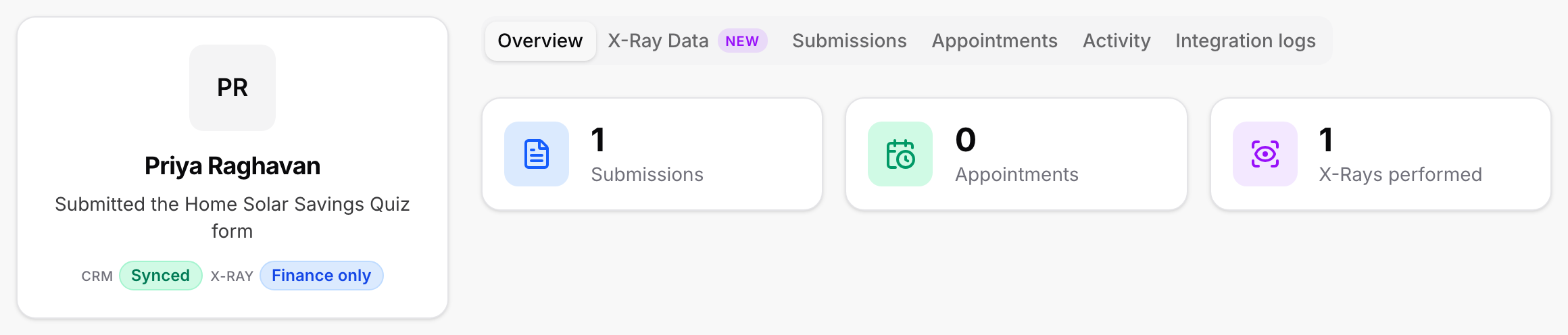
Finance only: An X-Ray Finance check came back with a result.
Running: The check is still in progress. If the credit service had a temporary problem, X-Ray tries once more automatically, about 90 seconds later.
No result: The check ran but did not return a result. Nothing was charged.
Skipped: The check did not run for this contact. The X-Ray Data tab says why.
Declined: This contact did not agree to the lookup on the form, so X-Ray will not run for them.
Opted out: This contact opted out of X-Ray through Your Privacy Choices, so X-Ray does not check them.
Not run: X-Ray has not run for this contact yet, for example because it is queued or no rule applies to the form.
The tab is one card. A short list on the left holds the sections, and the selected section shows on the right.
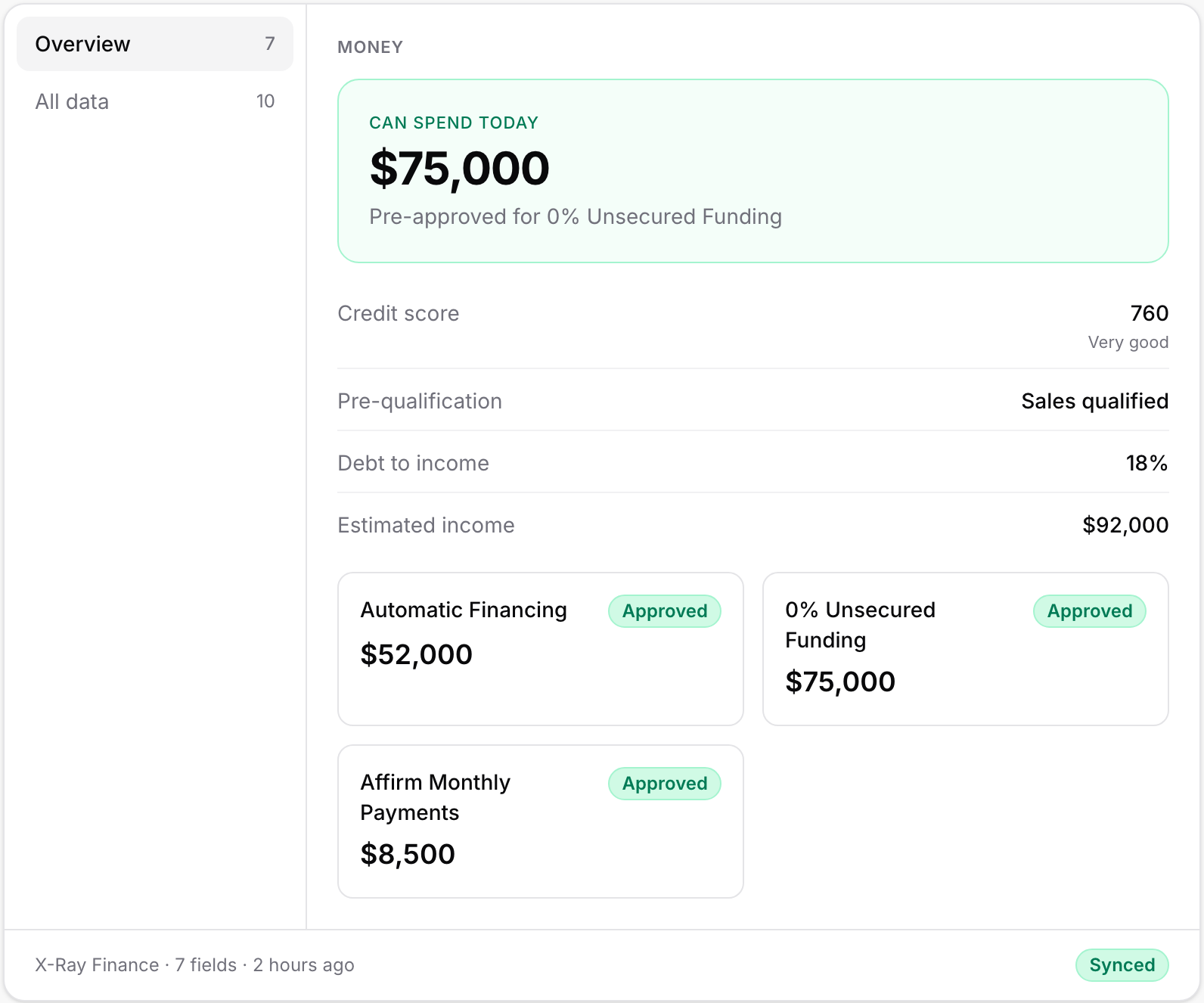
Overview shows a Money block. At the top, Can spend today gives the headline amount the lead is pre-approved for, with the name of the offer under it. Below that are the rows Credit score (with its band, from Exceptional down to Poor), Pre-qualification, Debt to income and Estimated income. Under those, each financing offer the lead qualifies for appears as a small card with its amount and, when there is one, a status such as Approved.
All data lists every value that came back as plain rows, under a Credit heading. It is the one to open when you are looking for a specific number.
A row with no value reads Not available. That is normal: some numbers do not come back for every lead. What Data X-Ray Returns explains when.
If you turned on the debt to income and income add-on but those two numbers did not come back, the Money block says so and tells you the add-on was not charged.
The footer shows where the data came from, how many fields came back and how long ago. If you have a CRM connected, it also shows the CRM sync badge: Synced, Pending, Failed, Fields dropped or Not Synced. See Sending X-Ray Data to GoHighLevel.
Each case has its own card, so you can tell them apart.
X-Ray Finance is running. The check has started and has not returned yet. Check back in a moment.
X-Ray Finance didn't return a result. The check ran but nothing usable came back. The card gives the reason in a sentence, for example that the credit service did not respond or could not process the details. No charge was made.
X-Ray Finance was skipped. The check did not run, and the card says why. The usual reasons:
The lead's name, email or US phone number was missing. X-Ray Finance needs a first and last name, an email and a US phone number.
The phone number is not a US number.
Your X-Ray wallet did not have enough funds.
Your X-Ray subscription is not active.
The contact was already checked in the last 14 days, so the check was not run or charged again.
This contact opted out. The card says "This contact opted out of X-Ray through Your Privacy Choices, so X-Ray doesn't check them." They used Your Privacy Choices on one of your forms, and X-Ray will not check them on any of your forms.
X-Ray has not run for this contact yet. Nothing has been attempted. The card names the reason, such as the lookup being queued, no X-Ray rule applying to the form this contact came from, or the contact having no usable email or phone number.
X-Ray is not turned on. Your account has no X-Ray subscription. The card shows a blurred preview and a Turn on X-Ray button, plus See plans. If you do not have billing access, the button is disabled and reads Contact your agency owner to enable X-Ray on hover. See Turning X-Ray On.

For the full list of reasons and what to do about each, see Why an X-Ray Lookup Did Not Run.
If the form scores leads with X-Ray Finance, the contact's score includes it. Click the score, either on the contact's Submissions tab or in the Contacts list, to open the Lead score dialog.
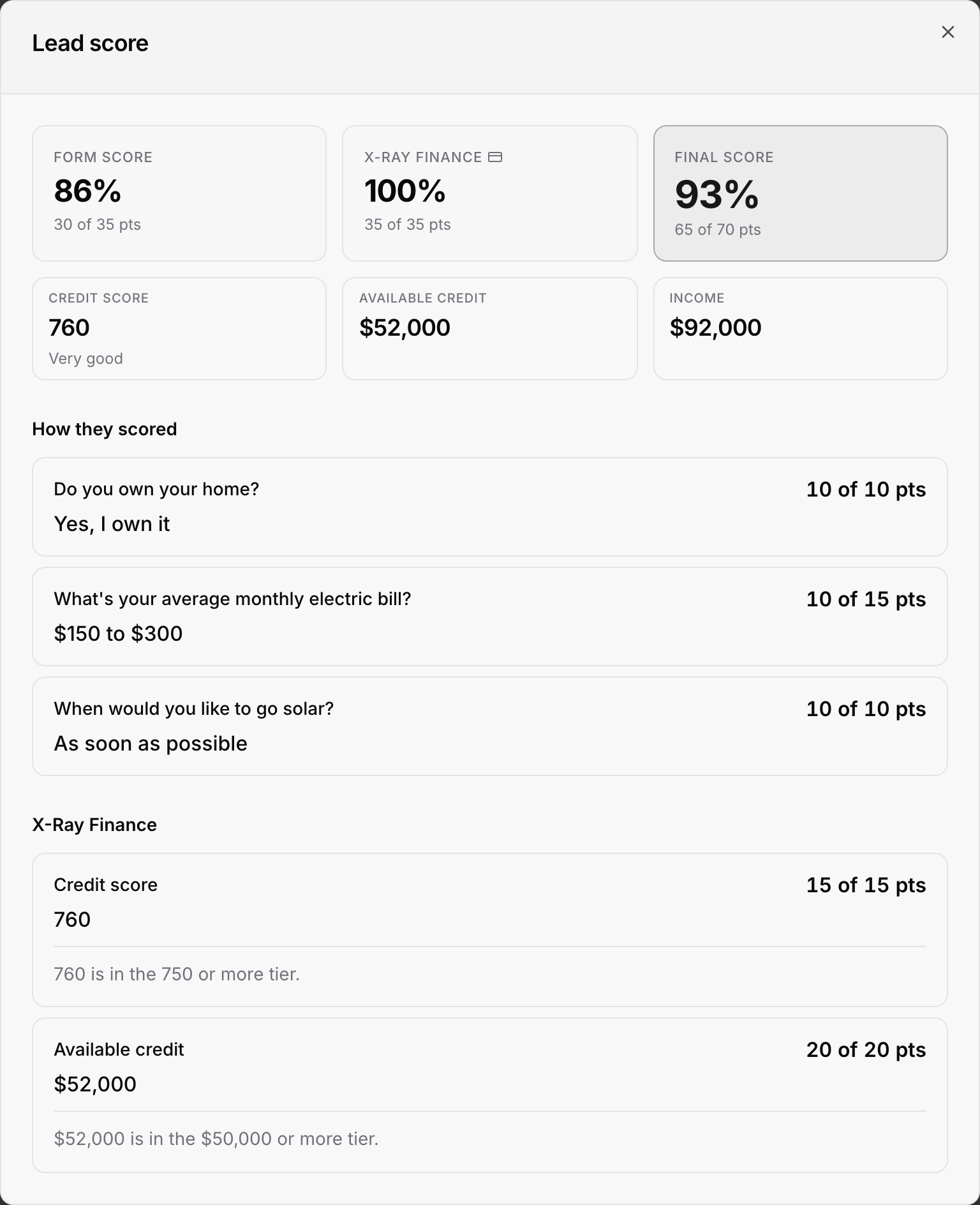
At the top are three tiles: Form score, X-Ray Finance and Final score. Under them, three small tiles show the Credit score (with its band), Available credit and Income that came back. A number that did not come back reads Not available.
Further down, the X-Ray Finance section shows each number the form scores, what it was, which tier it landed in and how many points it earned. A number that did not come back is marked Not counted.
If the lead was checked earlier, the section says From their credit check on followed by the date.
Two other states are worth knowing:
While the check is still running, the X-Ray Finance tile reads Pending and says the credit check is still running. The score updates when the check finishes.
If the check did not produce a score, the tile reads Not counted with the reason, for example that the credit check was skipped or failed.
You can switch between Percentage and Points with the Show score as menu on the Contacts list. See How leads are scored and Using X-Ray Finance in Lead Scoring.
There is no run button on this tab. X-Ray runs automatically for the leads your rules pick. See Can I Run X-Ray on a Lead by Hand?.
A contact keeps its X-Ray result even if you later cancel X-Ray. You paid for that check, so it stays.
A check is charged only when a result comes back. A badge of No result or Skipped means no charge.
For a view across all contacts, with what ran and what it cost, use X-Ray History.

